Submitting jobs from the command line with RAW API calls works, but isn’t exactly user friendly in the long run. Getting the results, you might also want to use it for something. I decided I wanted XMP sidecar files that my digikam can understand.
So, let’s get started!
Architecture decisions
As much as my decision process is extremely lightweight, I always have some choices to make. I must admit that more than one time, I’ve just picked whatever my AI sparring partner has suggested. So also this time.
Command line handling, there is quite a few libraries to choose from. This time I found click, that is quite easy to use.
For XMP metadata, I chose pyexiv2, although there exists several options.
The gory details – bit for bit
The main logic is ruled through the command line handling by clock, so we’ll start with that
@click.group()
@click.option(
    "--debug/--nodebug",
    default=False,
    help="Show full API responses instead of just the result.",
)
@click.pass_context

def cli(ctx, debug):
    """Media classifier CLI client."""
    ctx.ensure_object(dict)
    ctx.obj["debug"] = debug


@cli.command("submit")
@click.pass_context
@click.option(
    "--vision-model",
    "-m",
    help="Override vision model for this job.",
)
@click.option(
    "--agg-model",
    help="Aggregation model for video jobs (ignored for images).",
)
@click.option(
    "--nowait/--wait",
    default=False,
    help="Return immediately (--nowait) or wait for all jobs to finish (--wait, default).",
)
@click.option(
    "--xmps/--noxmps",
    default=False,
    help="Generate xmps (--xmps) or not (--noxmps, default).",
)
@click.option(
    "--desired-fps",
    help="Desired frames per seconds (subject to min and max)"
)
@click.argument(
    "files",
    type=click.Path(exists=True, dir_okay=False, path_type=Path),
    nargs=-1,
    required=True,
)
def submit_cmd(ctx, vision_model, agg_model, xmps, nowait, desired_fps, files):
    """Submit one or more files as jobs."""
    debug = ctx.obj.get("debug", False)
    jobs: List[str] = []

    for path in files:
        kind = filetype.guess(path)
        mime_type=kind.mime
        file_type=mime_type.split('/',1)[0]
        original_path = str(path)
        if file_type == "image" or file_type == "video":
          jid = _submit_one(file_type, path, vision_model, agg_model, desired_fps, original_path)
          jobs.append(jid)
          click.echo(f"{file_type} job: {path} -> {jid}")

    if not nowait:
        wait_for_jobs(xmps,debug,jobs)
    else:
        click.echo("Submitted jobs:")
        for jid in jobs:
            click.echo(f"  {jid}")


@cli.command("status")
@click.pass_context
@click.option(
    "--xmps/--noxmps",
    default=False,
    help="Generate xmps (--xmps) or not (--noxmps, default).",
)
@click.argument("job_ids", nargs=-1, required=True)
def status_cmd(ctx,xmps,job_ids):
    debug = ctx.obj.get("debug", False)
    """Show status for one or more jobs."""
    for jid in job_ids:
        data = _get_job(jid)
        if data is None:
            click.echo(f"{jid}: not found")
            continue

        click.echo(
            f"{jid}: {data['status']} "
            f"enqueued={data.get('enqueued_at')} "
            f"started={data.get('started_at')} "
            f"ended={data.get('ended_at')}"
        )
        if data.get("result") is not None:
            if debug:
              click.echo(json.dumps(data, indent=2))
            elif data.get("result") is not None:
              click.echo(json.dumps(data["result"], indent=2))

            click.echo(json.dumps(data["result"], indent=2))
            if xmps:
              first_result = data.get("result")
              result = first_result.get("result")
              if first_result["type"] == "image":
                update_xmp_for_image(first_result["original_path"],result["primary_label"],result["secondary_labels"],result["short_description"],result["confidence"],first_result["vision_model"])
              if first_result["type"] == "video":
                update_xmp_for_video(first_result["original_path"],result["primary_label"],result["secondary_labels"],result["short_description"],result["confidence"],first_result["vision_model"],first_result["aggregation_model"])


@cli.command("cancel")
@click.argument("job_ids", nargs=-1, required=True)
def cancel_cmd(job_ids):
    """Cancel one or more jobs."""
    for jid in job_ids:
        resp = client.post(f"{API_BASE}/jobs/{jid}/cancel")
        if resp.status_code == 404:
            click.echo(f"{jid}: not found")
            continue
        data = resp.json()
        click.echo(f"{jid}: {data.get('status', 'canceled')}")


if __name__ == "__main__":
    cli()
Some of this, i.e. the cancel function, isn’t implemented yet.
Submitting jobs: The submit command
mc_cli.py submit [--xmps] --vision-model <model> --agg-model <model> --desired-fps [--nowait|--wait] <files.....>
This is defined with the submit_cmd command given above. It runs through the files, detect the file type automatically, and calls _submit_one for all of the files.
It will either wait for completion, or it will just submit and print the job IDs. Note: The XMP generation doesn’t happen until the mc_cli.py program have gotten the result, so you’ll need to do that later. I mostly wait for completion, though.
If I decide to wait, it will run wait_for_jobs that runs a loop that will check status of the jobs. If you have decided to generate XMP files, that’s also where it will happen.
So, we start with _submit_one:
def _submit_one(file_type: str, path: Path, vision_model: str | None, agg_model: str | None,desired_fps: float | None,  original_path: str) -> str:
    files_param = {"file": (path.name, path.open("rb"))}
    params: Dict[str, str] = {"original_path": original_path}
    if vision_model:
        params["vision_model"] = vision_model
    if agg_model and file_type == "video":
        params["agg_model"] = agg_model
    if desired_fps and file_type == "video":
        params["desired_fps"] = desired_fps

    url = f"{API_BASE}/classify/{file_type.lower()}"
    resp = client.post(url, params=params, files=files_param)
    resp.raise_for_status()
    data = resp.json()
    return data["job_id"]
This will simply just submit the API call to the media classifier service and return the job ID.
The routing wait_for_jobs is more interesting:
def wait_for_jobs(xmps,debug, job_ids: List[str]) -> None:
    remaining: Dict[str, dict | None] = {jid: None for jid in job_ids}
    click.echo(f"Waiting for {len(job_ids)} job(s)...")

    while remaining:
        for jid in list(remaining.keys()):
            data = _get_job(jid)
            if data is None:
                click.echo(f"{jid}: not found")
                remaining.pop(jid, None)
                continue

            status = data["status"]

            if status in ("finished", "failed", "canceled"):
                click.echo(f"{jid}: {status}")
                if debug:
                    # Full job payload
                    click.echo(json.dumps(data, indent=2))
                if data.get("result") is not None:
                    click.echo(json.dumps(data["result"], indent=2))
                    if xmps:
                       first_result = data.get("result")
                       result = first_result.get("result")
                       if first_result["type"] == "image":
                          update_xmp_for_image(first_result["original_path"],result["primary_label"],result["secondary_labels"],result["short_description"],result["confidence"],first_result["vision_model"])
                       if first_result["type"] == "video":
                          update_xmp_for_video(first_result["original_path"],result["primary_label"],result["secondary_labels"],result["short_description"],result["confidence"],first_result["vision_model"],first_result["aggregation_model"])
                remaining.pop(jid, None)

        if remaining:
            time.sleep(POLL_INTERVAL)
It takes the list of job IDs, waits until they are finished one way or other, and print the results. Optionally, it will generate XMP files, either with update_xmp_for_image or update_xmp_for_video. Two routines, since the metadata I want to collect for the jobs are a bit different.
Generating XMP files.
For XMP file generation, I need to parse the result. Then I create, or add to, the file filename.xmp, where filename is the original filename.
XMP files are pretty complex with namespacing. Generally, you’d want your tags that other software should handle into the Xmp.dc namespace. Tags go into Xmp.dc.subject while description into Xmp.dc.description.
However, I decided to store other metadata in my own Xmp.mc namespace, where mc stands for media classifier. Here, I will add other metadata in addition, like for example what models have been used and the confidence.
I also decided to prefix the media classifier-generated tags with mc: in the Xmp.dc namespace, and the same with the description. The script will not overwite a manually set Xmp.dc.description, but all data (and without the mc: prefix) goes into the Xmp.mc namespace. This way, you can manually tag and create descriptions that doesn’t crash with the media classifier script. The media classifier scripts will, upon reruns, remove all previous tags and rewrite the description, too.
For image classification, this is my current code:
def update_xmp_for_image(image_path, primary_label, secondary_labels, short_description,confidence,vision_model):
    xmp_path=image_path+".xmp"
    # Build keywords string, comma-separated
    tags = [t for t in [primary_label, *(secondary_labels or [])] if t]
    if tags:
        mc_tags = [f"mc:{t}" for t in tags]

    if not os.path.exists(xmp_path):
       with open(xmp_path, "w") as f:
        # Minimal XMP skeleton
        f.write('<x:xmpmeta xmlns:x="adobe:ns:meta/"><rdf:RDF xmlns:rdf="http://www.w3.org/1999/02/22-rdf-syntax-ns/"></rdf:RDF></x:xmpmeta>')
    pyexiv2.registerNs('http://mc.engen.priv.no/', 'mc')
    with Image(xmp_path) as img:
         xmp_data = img.read_xmp()
         old_subjects = xmp_data.get("Xmp.mc.subject", [])
         print(f"Original mc subjects: {old_subjects}")
         new_subjects = []
         for tag in tags:
             if tag not in new_subjects:
                 new_subjects.append(tag)
         print(f"New subjects:      {new_subjects}")
         img.modify_xmp({"Xmp.mc.subject": new_subjects})
         current_subjects = xmp_data.get("Xmp.dc.subject", [])
         print(f"Original subjects: {current_subjects}")
         new_subjects = [tag for tag in current_subjects if not tag.startswith("mc:")]
         for tag in mc_tags:
             if tag not in new_subjects:
                 new_subjects.append(tag)
         print(f"New subjects:      {new_subjects}")
         img.modify_xmp({"Xmp.dc.subject": new_subjects})
         img.modify_xmp({"Xmp.mc.description": short_description})
         img.modify_xmp({"Xmp.mc.confidence": confidence})
         img.modify_xmp({"Xmp.mc.vision_model": vision_model})

         existing = xmp_data.get("Xmp.dc.description")

         write_to_dc = False

         if existing is None:
             write_to_dc = True
         else:
             # LangAlt can be dict or string depending on how it was written
             if isinstance(existing, dict):
                 # Example format: {'lang="x-default"': 'Some text'}
                 # Consider it empty if all language values are empty/whitespace
                 all_vals = [v.strip() for v in existing.values() if isinstance(v, str)]
                 if not all_vals or all(v == "" for v in all_vals):
                     write_to_dc = True
             elif isinstance(existing, str):
                 # Some tools may store a plain string
                 if existing.strip() == "":
                     write_to_dc = True
                 if existing.startswith("mc:"):
                     write_to_dc = True

         if write_to_dc:
             # Safest: write as LangAlt dict
             img.modify_xmp({
                 "Xmp.dc.description": {'lang="x-default"': "mc: " + short_description}
             })
As you can see, it will only write Xmp.dc.description if it’s empty or contains the mc: prefix.
For video classification, the logic is pretty similar, but there’s a bit more metadata I want to store:
def update_xmp_for_video(video_path, primary_label, secondary_labels, short_description,confidence,vision_model,aggregation_model):
    xmp_path=video_path+".xmp"
    # Build keywords string, comma-separated
    tags = [t for t in [primary_label, *(secondary_labels or [])] if t]
    if tags:
        mc_tags = [f"mc:{t}" for t in tags]

    if not os.path.exists(xmp_path):
       with open(xmp_path, "w") as f:
        # Minimal XMP skeleton
        f.write('<x:xmpmeta xmlns:x="adobe:ns:meta/"><rdf:RDF xmlns:rdf="http://www.w3.org/1999/02/22-rdf-syntax-ns/"></rdf:RDF></x:xmpmeta>')
    pyexiv2.registerNs('http://mc.engen.priv.no/', 'mc')
    with Image(xmp_path) as img:
         xmp_data = img.read_xmp()
         old_subjects = xmp_data.get("Xmp.mc.subject", [])
         print(f"Original mc subjects: {old_subjects}")
         new_subjects = []
         for tag in tags:
             if tag not in new_subjects:
                 new_subjects.append(tag)
         print(f"New subjects:      {new_subjects}")
         img.modify_xmp({"Xmp.mc.subject": new_subjects})
         current_subjects = xmp_data.get("Xmp.dc.subject", [])
         print(f"Original subjects: {current_subjects}")
         new_subjects = [tag for tag in current_subjects if not tag.startswith("mc:")]
         for tag in mc_tags:
             if tag not in new_subjects:
                 new_subjects.append(tag)
         print(f"New subjects:      {new_subjects}")
         img.modify_xmp({"Xmp.dc.subject": new_subjects})
         img.modify_xmp({"Xmp.mc.description": short_description})
         img.modify_xmp({"Xmp.mc.confidence": confidence})
         img.modify_xmp({"Xmp.mc.vision_model": vision_model})
         img.modify_xmp({"Xmp.mc.aggregation_model": aggregation_model})

         existing = xmp_data.get("Xmp.dc.description")

         write_to_dc = False

         if existing is None:
             write_to_dc = True
         else:
             # LangAlt can be dict or string depending on how it was written
             if isinstance(existing, dict):
                 # Example format: {'lang="x-default"': 'Some text'}
                 # Consider it empty if all language values are empty/whitespace
                 all_vals = [v.strip() for v in existing.values() if isinstance(v, str)]
                 if not all_vals or all(v == "" for v in all_vals):
                     write_to_dc = True
             elif isinstance(existing, str):
                 # Some tools may store a plain string
                 if existing.strip() == "":
                     write_to_dc = True
                 if existing.startswith("mc:"):
                     write_to_dc = True

         if write_to_dc:
             # Safest: write as LangAlt dict
             img.modify_xmp({
                 "Xmp.dc.description": {'lang="x-default"': "mc: " + short_description}
             })
The status command
If you’ve decided to not wait for the jobs to finish, you can pick up the logic by calling mc_cli.py status [–xmps|–noxmps] <job_ids>. This will do the same logic as in wait_for_jobs, though if the jobs isn’t finished yet, you have to rerun and get the status again, until all the jobs are finished. This can be useful if you want to use the script in other programs and don’t want to block a thread, but so far I haven’t really used it.
Using the results in digikam
You need to configure digikam to read metadata from XMP sidecas, and not use «Sidecar file names are compatible with commercial file names«. This is basically Adobe suite compatibility, something I don’t bother much with right now.
In digikam, you can browse and view all the metadata in the XMP files. You can also resynchronize the metadata from files if they are updated.
Last, there is a nice option I am toying with, batch queues. I have defined a workflow that calls mc_cli.py on the input file. Then you can select files in digikam and send it to the batch queue and have mc_cli.py ran for each and one of them. It might be fine for one off analysis, but I haven’t tested it extensively for more than a few files.
Choosing models and results
This is very much still a work in progress, but my current preference is qwen2.5vl:7b for classifying images/frames and qwen2.5vl:32b for video aggregation. It’s extremely good at following the instructions around JSON creation etc, and it’s decent on recognizing real life landmarks etc. It has so far given me pretty useful keywords and descriptions. I’ll include some image classifications here to show some examples:
A temple in athens

The tags for this is
- mc:temple ruins
- lysbilde
- mc:columns
- kassett6
- ok15
- mc:ancient
- Hellas
- mc:ruins
THose prefixed with mc: is what my media classifier has added, the rest are my manual tags. As you can see, here it hasn’t pinpointed which ruins it is, which can also be seen from the description
mc: the ruins of an ancient temple with tall columns and stone walls
The corinth canal
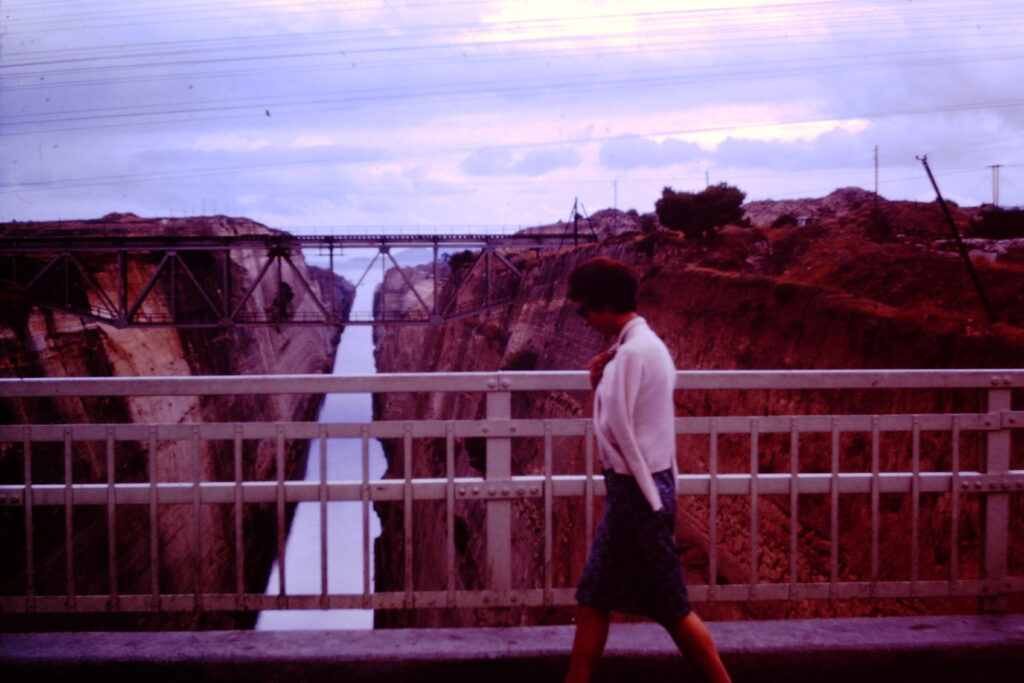
Tags:
- lysbilde
- kassett6
- ok15
- Hellas
- 1964
- mc:corinth canal
- mc:bridge
- mc:cliff
- mc:landscape
Description:
mc: a person walking on a bridge overlooking the Corinth Canal, with steep cliffs on either side
As you can see, the AI has actually classified this, correctly, as the Corinth Canal!
Arc de Triomphe

Tags from my classifier:
- mc:arc de triomphe at night
- mc:paris
- mc:landmark
- mc:monument
- mc:famous
Description:
mc: the arc de triomphe illuminated at night, with streaks of light from passing traffic
I’d say highly relevant tagging!
Kiyomizo-Dera temple in Kyto

Tags from mc:
- mc:kiyomizu-dera temple
- mc:japanese architecture
- mc:tourists
- mc:mountain
Description:
mc: a view of the kiyomizu-dera temple perched on a mountain, with tourists enjoying the scenic location
Summary and future plans
With mc_cli.py my media classification system finally became useful in real applications. I’m more than happy with the actual results, and the workflow with digikam is decent enough that I actually might want to run it on a sizable portion of my image collection! Although it will take time, we’re talking around a minute of a single image analysis.
It’s still using only. a pretty general prompt. I might want to classify vacation pictures differently from concert pictures, beer label pictures(I’m a beer lover) and West Coast Swing pictures (I dance West Coast Swing). So I do want to implement a way to extend it with more prompts,
And of course: Face recognizion. it defiinitely needs that.
Stay tunes, some of that I’ll definitely implement soon!