Most modern systems have some form of face recognizion. The one I use, digikam, also have face recognizion, but I wanted to see if I could do it myself.
Besides, wouldn’t it be cool if my ollama-generated descriptions could say «Vegard And Anita on a mountain top» instead of just «A man and a woman on a mountain top» ?
One option would of course be to still do the face recognizing in digikam, and then write to XMPs, before running the image classification, generating XMPs that is then read back into digikam.
But a cleaner workflow is definitely «take this bunch of images and run the image classification on them» before importing them into digikam. So, roll-your-own it is this time, too. It’s also less dependent on digikam, should I wish to switch to something else.
Choosing a face recognizion library
As has become my habit, my decision process was swift. InsightFace looked like it was easy enough to work with, so that’s what I chose.
Jumping into the code
The core of my face recognizion code is in a new file, faces_core.py. It’s a bit long, most of it I have used AI to write. It basically allows me to extract faces from images, setting tags on those faces, and store the tag/face matches in a tiny database. Upon matching, the InsightFace library will match faces from the image being analyzed to the faces in the database. If the similarity is high enough, we call it a match.
# faces_core.py
import logging
from dataclasses import dataclass
from pathlib import Path
from typing import List, Optional, Dict, Any

import numpy as np
import insightface
from insightface.app import FaceAnalysis

import cv2

logger = logging.getLogger("media-classifier-faces")

# You can tweak this by env var if you want
FACES_ROOT = Path("/data/media_classifier/faces")
FACES_DB_PATH = FACES_ROOT / "faces_db.npz"


def l2_normalize(v: np.ndarray) -> np.ndarray:
        v = v.astype("float32")
        n = np.linalg.norm(v)
        if n == 0:
           return v
        return v / n

@dataclass
class FaceEmbedding:
    person_id: Optional[str]  # None for unknown
    embedding: np.ndarray
    bbox: List[int]           # [x1, y1, x2, y2]
    det_score: float

@dataclass
class FaceMatchResult:
    person_id: Optional[str]
    distance: float
    face: FaceEmbedding
class FaceDB:
    """
    Tiny in-memory DB; for your use case this is probably enough.
    Stores one embedding per known face instance.
    """
    def __init__(self) -> None:
        self.person_ids: List[str] = []
        self.embeddings: Optional[np.ndarray] = None  # shape (N, D) float32

    def load(self, path: Path = FACES_DB_PATH) -> None:
        logger.info("Num images: %d", len(self.person_ids))
        if not path.exists():
            logger.info("Face DB not found at %s, starting empty", path)
            self.person_ids = []
            self.embeddings = None
            return
       data = np.load(path, allow_pickle=True)
        self.person_ids = data["person_ids"].tolist()
        self.embeddings = data["embeddings"].astype("float32")
        logger.info("Loaded face DB: %d entries", len(self.person_ids))

    def save(self, path: Path = FACES_DB_PATH) -> None:
        path.parent.mkdir(parents=True, exist_ok=True)
        if self.embeddings is None:
            # nothing to save
            np.savez(path, person_ids=np.array([], dtype=object), embeddings=np.zeros((0, 512), dtype="float32"))
        else:
            np.savez(path, person_ids=np.array(self.person_ids, dtype=object), embeddings=self.embeddings)
        logger.info("Saved face DB: %d entries to %s", len(self.person_ids), path)

    def add(self, person_id: str, embedding: np.ndarray) -> None:
        embedding = embedding.astype("float32")
        embedding = l2_normalize(embedding)
        if self.embeddings is None:
            self.embeddings = embedding.reshape(1, -1)
            self.person_ids = [person_id]
        else:
            self.embeddings = np.vstack([self.embeddings, embedding.reshape(1, -1)])
            self.person_ids.append(person_id)

    def match(self, embedding: np.ndarray) -> Optional[FaceMatchResult]:
        """
        Return best match (L2 distance) or None if DB empty.
        """
        if self.embeddings is None or len(self.person_ids) == 0:
            return None
        e = l2_normalize(embedding).reshape(1, -1)
        # L2 distance; you can also use cosine
        diff = self.embeddings - e
        dists = np.sqrt(np.sum(diff * diff, axis=1))
        idx = int(np.argmin(dists))
        return FaceMatchResult(
            person_id=self.person_ids[idx],
            distance=float(dists[idx]),
            face=FaceEmbedding(
                person_id=self.person_ids[idx],
                embedding=embedding,
                bbox=[],
                det_score=0.0,
            ),
        )

# Singleton-ish app model; you can also manage this differently in worker startup.
_face_app: Optional[FaceAnalysis] = None

def get_face_app(providers: Optional[list] = None) -> FaceAnalysis:
    """
    Lazily initialize InsightFace FaceAnalysis.
    Model name 'buffalo_l' is a good default; adjust if needed.
    """
    global _face_app
    if _face_app is None:
        logger.info("Initializing InsightFace FaceAnalysis...")
        app = FaceAnalysis(
            name="buffalo_l",   # or "buffalo_s", etc.
            providers=providers or ["CPUExecutionProvider"],
        )
        # ctx_id = 0 if you want GPU, -1 for CPU in some versions;
        # with FaceAnalysis from insightface>=0.7, prepare(ctx_id=0, det_size=(640, 640))
        app.prepare(ctx_id=0, det_size=(640, 640))
        _face_app = app
    return _face_app

def detect_and_embed_faces(image_bgr: np.ndarray) -> List[FaceEmbedding]:
    """
    Run detection + embedding on a BGR image (e.g. OpenCV image).
    """
    app = get_face_app()
    faces = app.get(image_bgr)
    results: List[FaceEmbedding] = []
    for f in faces:
        # f.bbox: [x1, y1, x2, y2], f.det_score, f.embedding (L2-normalized)
        emb = l2_normalize(np.array(f.embedding, dtype="float32"))
        results.append(
            FaceEmbedding(
                person_id=None,
                embedding=emb,
                bbox=[int(v) for v in f.bbox],
                det_score=float(f.det_score),
            )
        )
    return results

def recognize_faces(
    image_bgr: np.ndarray,
    facedb: FaceDB,
    high_thresh: float = 0.8,
    low_thresh: float = 1.2,
) -> List[Dict[str, Any]]:
    """
    Detect faces and match them against DB.
    Return a list of dicts you can put directly into your job result:
    {
        "bbox": [x1, y1, x2, y2],
        "det_score": float,
        "person": "alice" or None,
        "distance": float or None,
        "status": "known" | "maybe" | "unknown",
    }
    """
    embeddings = detect_and_embed_faces(image_bgr)
    out: List[Dict[str, Any]] = []

    for idx, fe in enumerate(embeddings):
        match = facedb.match(fe.embedding)
        if match is None:
            out.append(
                {
                    "index": idx,
                    "bbox": fe.bbox,
                    "det_score": fe.det_score,
                    "person": None,
                    "distance": None,
                    "status": "unknown",
                }
            )
            continue

        d = match.distance
        if d <= high_thresh:
            status = "known"
        elif d <= low_thresh:
            status = "maybe"
        else:
            status = "unknown"

        out.append(
            {
                "index": idx,
                "bbox": fe.bbox,
                "det_score": fe.det_score,
                "person": match.person_id if status != "unknown" else None,
                "distance": d,
                "status": status,
            }
        )
    return out


# ... existing imports / FaceDB / detect_and_embed_faces / recognize_faces ...

logger = logging.getLogger("media-classifier-faces")

def add_faces_from_image_path(image_path: Path, person_id: str, min_det_score: float = 0.4) -> int:
    """
    Load an image, detect faces, and add all faces above min_det_score
    to the FaceDB under person_id. Returns number of faces added.
    """
    from faces_core import FaceDB, detect_and_embed_faces  # or adjust imports if needed

    img = cv2.imread(str(image_path))
    if img is None:
        logger.warning("Failed to read image for training: %s", image_path)
        return 0

    db = FaceDB()
    db.load()

    faces = detect_and_embed_faces(img)
    added = 0
    for fe in faces:
        if fe.det_score < min_det_score:
            continue
        db.add(person_id, fe.embedding)
        added += 1

    if added:
        db.save()
        logger.info("Added %d faces for %s from %s", added, person_id, image_path)
    else:
        logger.info("No faces added for %s from %s", person_id, image_path)

    return added


def add_faces_from_indices(
            image_path: Path,
            person_id: str,
            face_indices: List[int],
            min_det_score: float = 0.4,
    ) -> int:
    """
    Detect faces in the full image and add only the chosen indices
    to the FaceDB for person_id.
    """
    img = cv2.imread(str(image_path))
    if img is None:
        logger.warning("Failed to read image for training: %s", image_path)
        return 0

    db = FaceDB()
    db.load()

    faces = detect_and_embed_faces(img)
    added = 0
    for idx in face_indices:
        if idx < 0 or idx >= len(faces):
            logger.warning("Invalid face index %d for %s", idx, image_path)
            continue
        fe = faces[idx]
        if fe.det_score < min_det_score:
            continue
        db.add(person_id, fe.embedding)
        added += 1

    if added:
        db.save()
        logger.info(
            "Added %d faces for %s from %s (indices=%s)",
            added,
            person_id,
            image_path,
            face_indices,
        )
    else:
        logger.info("No faces added for %s from %s", person_id, image_path)

    return added
The results
The result from the matching routine is an array with faces detected in the image, including non-matched. You may choose to train the model to catch also those unknown faces, of course.
 "faces": [
    {
      "index": 0,
      "bbox": [
        3296,
        1406,
        3455,
        1587
      ],
      "det_score": 0.8602350950241089,
      "person": "person2",
      "distance": 0.9523441791534424,
      "status": "maybe",
      "person_internal": "person2",
      "person_display": "Person 2 Name",
      "person_hier_tag": "Personer/Person 2 Name"
    },
    {
      "index": 1,
      "bbox": [
        3855,
        1351,
        4188,
        1802
      ],
      "det_score": 0.8554136753082275,
      "person": null,
      "distance": 1.2385478019714355,
      "status": "unknown"
    },
    {
      "index": 2,
      "bbox": [
        2905,
        1338,
        2990,
        1457
      ],
      "det_score": 0.7812438011169434,
      "person": null,
      "distance": 1.2173501253128052,
      "status": "unknown"
    },
    {
      "index": 3,
      "bbox": [
        416,
        1208,
        538,
        1331
      ],
      "det_score": 0.7775191068649292,
      "person": null,
      "distance": 1.3067371845245361,
      "status": "unknown"
    },
    {
      "index": 4,
      "bbox": [
        1947,
        1483,
        2080,
        1678
      ],
      "det_score": 0.7738845348358154,
      "person": null,
      "distance": 1.3292980194091797,
      "status": "unknown"
    },
    {
      "index": 5,
      "bbox": [
        2999,
        1379,
        3148,
        1530
      ],
      "det_score": 0.768534779548645,
      "person": "person1",
      "distance": 1.1458020210266113,
      "status": "maybe",
      "person_internal": "person1",
      "person_display": "Person One Name",
      "person_hier_tag": "Personer/Person One Name"
    },
    {
      "index": 6,
      "bbox": [
        3607,
        1475,
        3814,
        1790
      ],
      "det_score": 0.7576825618743896,
      "person": null,
      "distance": 1.336568832397461,
      "status": "unknown"
    },
    {
      "index": 8,
      "bbox": [
        1517,
        1651,
        1786,
        2052
      ],
      "det_score": 0.7267563939094543,
      "person": null,
      "distance": 1.2785133123397827,
      "status": "unknown"
    }
  ],
This tells me that I have recognized two faces, but there are more. I can choose to ignore the unknown for now.
Part of the choices you need to make is what the thresholds for matches are. I’ve said that anything with a distance less than 0.8 is a match and anything between 0.8 and 1.2 is a maybe. In my experience, this errs on the side of caution and I have yet to see any false positives. Both of these matches was a «maybe», but in reality they matched.
Training the face-database.
The workflow I have is, I guess, decent but not perfect. It would probably be better in a GUI, but even text-based there is room for improvement. But it works.
To train, I simply call mc_cli.py train-faces –person <person> <image>. The script will then give me an URL to a preview where all the faces are outlined, numbered, and asks me which of the faces I want to train on. I type in the number, and off it goes and register a face for that person.
I also have a mapping-table between face IDs, friendly names and hierarchical tags, which I basically needed because I want my detected faces to fall nicely into where they belong in digikam. I create records for this with mc_cli.py <id> -d «Designated Name» -h «Hierarchical tag», i.e. mc_cli.py Vegard -d «Vegard Engen» -h «Persons|Family|Vegard Engen».
Matching faces
Faces are matched in the standard image classification pipeline, which is extended to run two tasks, face detection and image classification, and return a combined JSON. Tags are created in the XMPs for the matches, should I choose to create XMPs, so that digikam can get to the results and add tags.
Using detected faces in the image descriptions
One of the things I wanted was to let the descriptions name the persons instead of generic «man», «woman», «couple» etc. To get it to do this, we need to embed the face matches into the prompt and have the LLM used it. And it really feels like magic when it works.
Creating an extension to the prompt for the faces
We keep the image prompt mostly the same, but add an extra addition with instructions for how to wire in faces. The we run the same routine as before but with this extended prompt which makes it mention names in the description.
def build_image_prompt_with_faces(face_map_text: str, faces: List[Dict[str, Any]]) -> str:
    """
    Extend IMAGE_PROMPT with optional known-face context.
    """
    extra = ""
    names = []
    for f in faces:
         name = f.get("person")
         status = f.get("status")
         if not name or status not in ("known", "maybe"):
              continue
         if name not in names:
              names.append(name)

    if face_map_text and names:
      if len(names) == 1:
                      # Strong instruction for single known person
            name = names[0]
            extra = (
                   f"\n\nThere is exactly one clearly recognized person in this image: {name}.\n"
                   f"You MUST refer to this person by the name '{name}' instead of using generic phrases like\n"
                   f"'a woman', 'a man', or 'a person'.\n"
                   f"You MUST lways capitalize people names."
                   f"If the scene shows this person doing something, describe it using the name '{name}'.\n\n"
                   + face_map_text +
                   "\nOutput one or two natural sentences describing the scene, using this name.\n"
            )
      else:
            # Multiple names: keep the more cautious wording
            people_str = ", ".join(names[:-1]) + f" and {names[-1]}" if len(names) > 1 else names[0]
            extra = (
               "\n\nThere are multiple clearly recognized people in this image.\n"
                f"Their names are: {people_str}.\n"
                "You MUST refer to them by these names instead of generic phrases like 'a couple',\n"
                "'a man and a woman', or 'two people'.\n"
                "Whenever you describe what they are doing, use their names (e.g., 'Anita and Vegard stand at a scenic overlook').\n"
                "Never invent names that are not in the list.\n\n"
                + face_map_text +
                "\nOutput one or two natural sentences describing the scene, using these names.\n"
            )
    return IMAGE_PROMPT + extra
As always, the prompt is extremely important, to make it do exactly as you want.
Result 1: Me and Anita on a coach
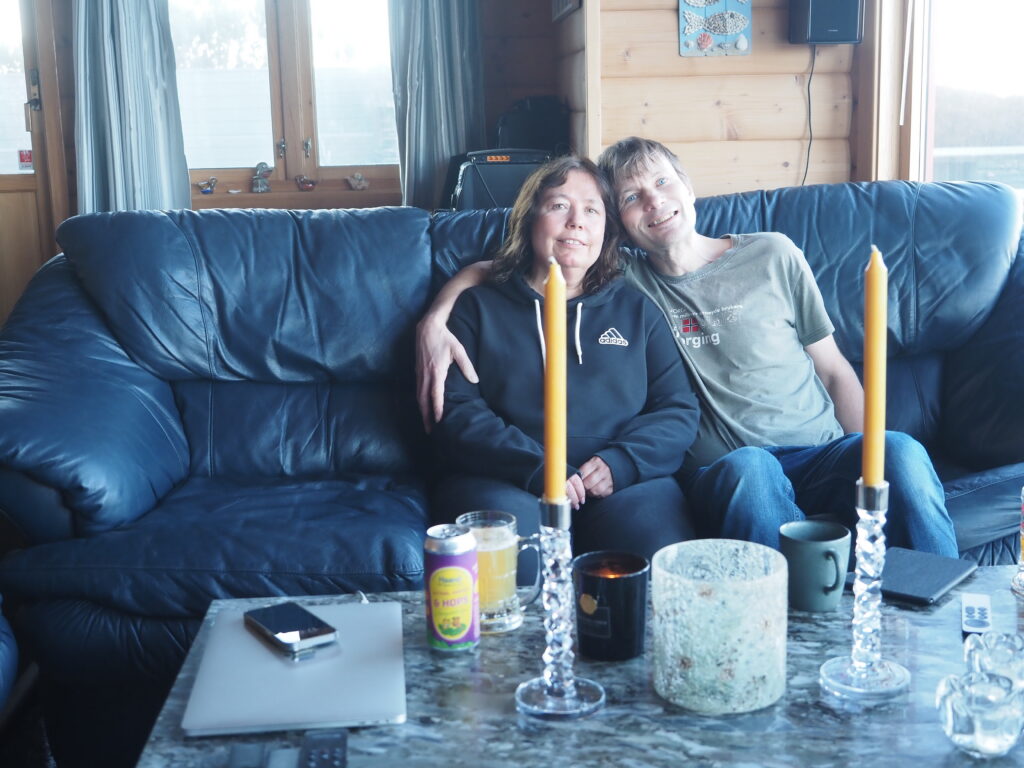
The result for this image came back as:
{
  "type": "image",
  "path": "/data/media_classifier/uploads/20260211T182047_d0e18e80.JPG",
  "original_path": "/Users/vegardengen/Photos/2024/Helles\u00f8y 16. mars 2024/uten navn-52.JPG",
  "result": {
    "primary_label": "living room",
    "secondary_labels": [
      "couch",
      "candles",
      "people"
    ],
    "confidence": 0.9,
    "short_description": "Anita and Vegard are relaxing on a couch in a cozy living room with candles and a laptop on the table.",
    "faces": {
      "faces": [
        {
          "index": 0,
          "bbox": [
            2698,
            880,
            3067,
            1344
          ],
          "det_score": 0.8717713952064514,
          "person": "Anita",
          "distance": 0.6166095733642578,
          "status": "known",
          "person_internal": "Anita",
          "person_display": "Anita",
          "person_hier_tag": "Familie|Anita"
        },
        {
          "index": 1,
          "bbox": [
            3108,
            777,
            3511,
            1256
          ],
          "det_score": 0.8563373684883118,
          "person": "Vegard",
          "distance": 0.0,
          "status": "known",
          "person_internal": "Vegard",
          "person_display": "Vegard",
          "person_hier_tag": "Familie|Vegard"
        }
      ]
    }
  },
  "faces": [
    {
      "index": 0,
      "bbox": [
        2698,
        880,
        3067,
        1344
      ],
      "det_score": 0.8717713952064514,
      "person": "Anita",
      "distance": 0.6166095733642578,
      "status": "known",
      "person_internal": "Anita",
      "person_display": "Anita",
      "person_hier_tag": "Familie|Anita"
    },
    {
      "index": 1,
      "bbox": [
        3108,
        777,
        3511,
        1256
      ],
      "det_score": 0.8563373684883118,
      "person": "Vegard",
      "distance": 0.0,
      "status": "known",
      "person_internal": "Vegard",
      "person_display": "Vegard",
      "person_hier_tag": "Familie|Vegard"
    }
  ],
  "vision_model": "qwen2.5vl:7b"
}
As always, this is pretty verbose, it’s meant to be parsed by software but is pretty readable. Notice that distance is 0.0 for me (Vegard), which means that likely I trained a face from this for me. The distance for Anita is larger, but still a match, so I didn’t train a match for Anita for this image
Result 2: Me and my dog
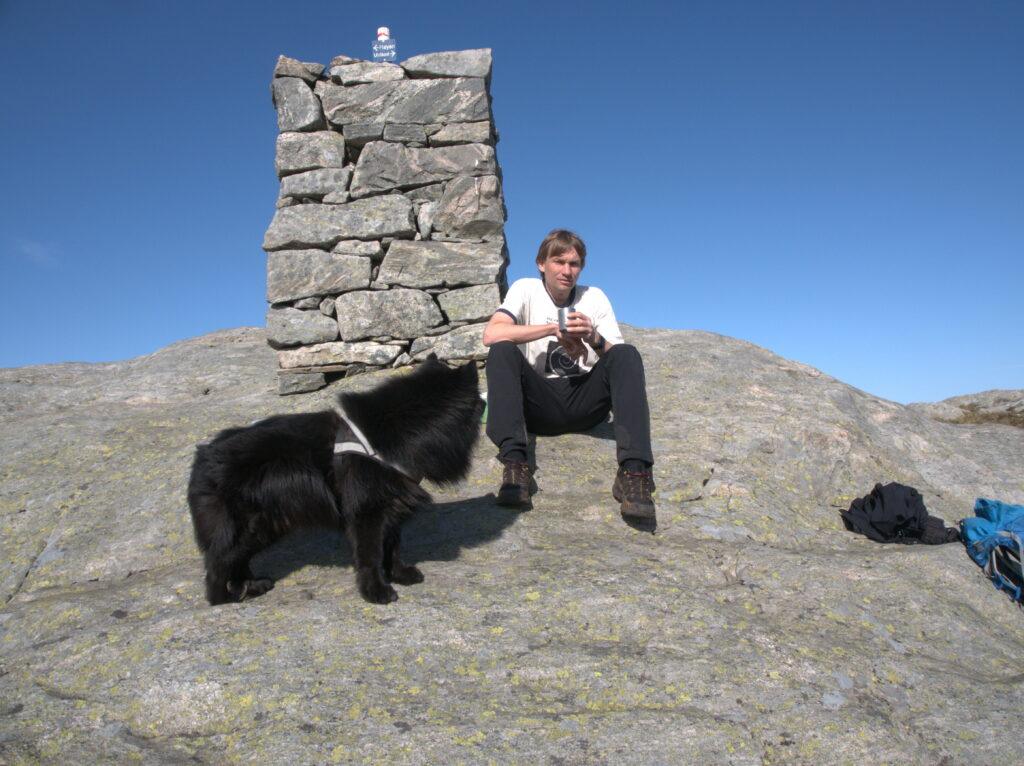
{
  "type": "image",
  "path": "/data/media_classifier/uploads/20260211T183125_97736b04.jpg",
  "original_path": "/Volumes/nasdisk_photos/2018/Vidden Mai 2018/P5185083.jpg",
  "result": {
    "primary_label": "mountain top",
    "secondary_labels": [
      "dog",
      "hiking",
      "outdoor"
    ],
    "confidence": 0.9,
    "short_description": "Vegard sits on a rocky mountain top with a black dog, enjoying the view",
    "faces": {
      "faces": [
        {
          "index": 0,
          "bbox": [
            2474,
            1121,
            2638,
            1317
          ],
          "det_score": 0.8611676096916199,
          "person": "Vegard",
          "distance": 0.7801758646965027,
          "status": "known",
          "person_internal": "Vegard",
          "person_display": "Vegard",
          "person_hier_tag": "Familie|Vegard"
        }
      ]
    }
  },
  "faces": [
    {
      "index": 0,
      "bbox": [
        2474,
        1121,
        2638,
        1317
      ],
      "det_score": 0.8611676096916199,
      "person": "Vegard",
      "distance": 0.7801758646965027,
      "status": "known",
      "person_internal": "Vegard",
      "person_display": "Vegard",
      "person_hier_tag": "Familie|Vegard"
    }
  ],
  "vision_model": "qwen2.5vl:7b"
}
Ideally, I’d also like to name the dog, whose name is «Kasan». However, the face recognizing model does human faces only, so I can’t do that at this point. But of course, I’m not the first one with this wish, so PetFace exists…however, that’s a task for another day 🙂
Conclusions? Further work?
I haven’t yet incorporated this into my video workflow, but that’s mainly just more of the same.
I am pretty satisifed with the results, so satisifed that I will likely incorporate as a preprocessing-step before adding images to digikam. I can still tag and add manual descriptions, of course, but now I’ll get a head start with some automated suggestions.
There’s also possibilities of training on your own images, so that it for example can recognize your cabin, places you regularly go hiking, etc. A lot of images also has GPS data embedded, and that’s another datapoint to pinpoint a place.
Since I’m using an LLM, I also want to experiment with customized prompt depending on what kind of image it is. A west coast event image is different from a vacation snap, which again is diffferent from family pictures. Tailored prompts might give me better descriptions for the different purposes.
E