I am kind of still amazed how much information exists in mere 7 billion tokens in an ai model (my current preferred model, qwen2.5vl:7b). It is pretty good at understand what happens in an image, and it also is able to, all by itself, recognize places like the Corinth Canal, Eiffel Tower, the Kiomizu-Dera Temple in Kyoto and the Saint Peters Square in Venezia, and quite often give a pretty basic but decent caption of the image.
Wth some help from insightface.ai, I was able to add the people in the image into tha captions, in part four of my image classification journey. This set me on the track on the task in this blog post, places. Where a picture is taken is something else you can tell the AI before you ask him to describe it. And luck has it, a lot of images, especially those taken with a cell phone, already have coordinates embedded in the metadata! It would be a shame not to use it….
Getting to the place information
Some more privacy minded people have probably turned off the GPS tracking, I see it as valuable metadata it’d be shame to waste. Of course, I might still want to filter away those GPS tags before I post the images publically, but for my own consumption, I kind of like to have as much data I can.
No model, at least not the ones I have seen, have a way to automatically turn a GPS into a place. For that, you’ll need a mapping service. somewhere.
Can I host it myself? This is a blog about self-hosting stuff, so I seriously contemplated this. The most promising way is to host a nominatim instance, where you can use open map data from the OpenStreetmap project. I’ve been an avid contributor to Openstreetmap at times, and being the son of a land surveyor, I have probably genetically inheterited an interest in mapping and geography.
In the end, I figured out I needed to dedicate a sizeable amount of SSD and a sizeable amount of RAM to running such a service – and even more every time I update it, which I of course would want to do do. Who knows – maybe I’ll test the concept at a smaller scale at some point, but for now I decided I need an external lookup service, and preferably one based on open data.
OSMs own Nominatim was one option, but I decided I couldn’t guarantee I’d stay within the usage policy. It would probably be fine for my private project, though, but I decided to look at other alternatives first.
Choice fell on https://geocode.maps.co/, which has a free «demo account» that’s limited to 25000 requests at 5 requests/seconds, and then degrade to 1 request per second. Since I am running pretty single-threaded for now, and the reverse geocoding lookups are one lookup per classification, where the Ollama run will always take much longer, I’ll never be able to saturate that! This and the fact that for now this is my own small pet project, I got myself an API key and started using it.
Reverse geocoding from EXIF GPS tags
Having chosen the service, it was time to see if I could use location info for something. I first need to extract the coordinates from the images. This, I happily delegated to AI, but I’ll describe the solution.
The result is a gpshelper.py library, with the following function to extract GPS information from an image. My personal policy about AI usage is that I’ll not use code I don’t understand, but AI definitely helps me speed up development process.
def extract_gps(path: Path) -> Tuple[Optional[float], Optional[float]]:
    """Return (lat, lon) in decimal degrees from EXIF, or (None, None).

    - Uses Exif.GPSInfo.GPSLatitude / GPSLongitude (+ Ref) from the file.
    - Applies S/W sign.
    - Does not touch any XMP.
    """
    if not path.exists():
        return None, None

    with ExivImage(str(path)) as img:
        exif = img.read_exif()

    lat = exif.get("Exif.GPSInfo.GPSLatitude")
    lon = exif.get("Exif.GPSInfo.GPSLongitude")
    lat_ref = exif.get("Exif.GPSInfo.GPSLatitudeRef")
    lon_ref = exif.get("Exif.GPSInfo.GPSLongitudeRef")

    if not (lat and lon and lat_ref and lon_ref):
        return None, None

    gps_lat = _to_deg(lat)
    gps_lon = _to_deg(lon)
    if gps_lat is None or gps_lon is None:
        return None, None

    if lat_ref == "S":
        gps_lat = -gps_lat
    if lon_ref == "W":
        gps_lon = -gps_lon

    return gps_lat, gps_lon
This is a function you feed an image and gets the EXIF-encoded GPS coordinates back.
Gathering the metadata
My main image classification function is process_image_job, which is actually short enough to show it here. I first decode faces and GPS coordinates, generate a textual representation of the place, and then I feed the image, the face information and the place information to classify_image_with_model. Oh, I also have the start of a «hints» framework, for the cases where you might have some extra information to feed the model. It kind of works but gives no useful results so far, so I’ll leave it out for now. But when you see the code for it, don’t be confused.
So, here’s the process_image_job:
 def process_image_job(image_path: str,
                      vision_model: Optional[str] = None, original_path: str | None = None, hints: Optional[str] = None,) -> Dict[str, Any]:
    """
    RQ job: classify a single image.
    """
    p = Path(image_path)

    # New face recognition block
    faces_info = process_image_faces(p)
    faces_list = faces_info.get("faces", [])
    faces_list = attach_face_metadata(faces_list)

    gps_lat, gps_lon = extract_gps(p)
    if gps_lat is not None and gps_lon is not None:
        placeinfo = resolve_place_for_coord(gps_lat, gps_lon, use_fallback_geocode=True)
    else:
        placeinfo = {
            "gps_lat": None,
            "gps_lon": None,
            "place_id": None,
            "place_label": None,
            "place_kind": None,
            "place_distance_m": None,
            "place_source": None,
        }

    logger.info(json.dumps(faces_list))
    result = classify_image_with_model(p, model=vision_model or VISION_MODEL, faces=faces_list, place=placeinfo, hints=hints)
    raw_faces = result.get("faces")
    if isinstance(raw_faces, dict):
        faces_list = raw_faces.get("faces") or []
    elif isinstance(raw_faces, list):
        faces_list = raw_faces
    else:
        pass

    faces_list = attach_face_metadata(faces_list) or []

    if faces_list:
                result["faces"] = {"faces": faces_list}

    result["place"] = placeinfo

    record = {
        "ts": datetime.utcnow().isoformat(),
        "type": "image",
        "path": str(p),
        "model": vision_model or VISION_MODEL,
        "image_result": result,
        "faces": faces_list,
        "place": placeinfo,
        "hints": hints,

    }
    append_feedback_record(record)

    return {
        "type": "image",
        "path": str(p),
        "original_path": original_path,
        "result": result,
        "faces": faces_list,
        "vision_model": vision_model or VISION_MODEL,
        "place": placeinfo,
        "hints": hints
    }
This feeds the image and all the metadata off to the classification job, that is responsible for building the prompt and crafting the result structure.
The function to generate structural place information from the GPS coordinates is placeinfo = resolve_place_for_coord(gps_lat, gps_lon, use_fallback_geocode=True). This function has evolved to be a bit complex, but I’ll describe the basis of my reverse geocoding system.
The reverse geocoding system
I decided that places on a form like «Town, County, Contry» might be fine for a general use case. But to actually gettjng results meaningful for me, I decided I needed my own labels on a lot of the places. Having that in place, I have started using that system more and more for the places I actually care about (like the peak of the mountain top that is the destination of my hike), as well as more personal places like «The cabin at Hellesøy», which is where a sizeable amount of my pictures are taken. It’s more meaningful to tell the model that place name than the actual exact location the cabin is in.
So, I needed a system to create places. But place information is a beast, not all places are equal. A place that is a town has a much wider geographical area than a place that is a cabin, so I needed a way to match a GPS coordinate to a known place within the margin of a varying radius, not only plus/minus 50 meters or such.
The result is that every place is a kind of place. If it’s local, the radius is 150 meter, if it’s village, I have set the radius at 2000 meters. When I register a place, I actually take the coordinates from a picture and tell it that this image is taken at the cabin at hellesøy, which is of type local which has a pretty small radius per default. I can also override radius manually.
So, I take the coordinates and run through and matches it to all my places, and I might find a match, If so, I’m finished, I return the data back.
If there is no match is where the reverse geocoding api I mentioned at the beginning comes in: I’ll look it up and get a result of type «Place, Town, County, Country» or such back. It’s actually still proven valuable to the model to have that information, though, knowing that a temple is in Kyoto and not Tokyo may make the model pinpoint the answer more.
In the end, I get a structure about like this:
    {
        "gps_lat": lat,
        "gps_lon": lon,
        "place_id": ... or None,
        "place_label": ... or None,
        "place_kind": ... or None,
        "place_distance_m": ... or None,
        "place_source": "registry" | "geocode-maps" | "gps-only"
    }
In the case of the cabin at Hellesøy, place_kind will be local and place_label will be The Cabin at Hellesøy. The place source will be registry, which is useful information for troubleshooting all of this….
In case it’s the geocoding api, the result will be of type «Place, Town, County, Country», place_kind will be derived from the answer from the API, and the place_source will be geocode-maps. If both of these fails, only gps coordinates are meaningful and source is gps-only. For now, I have no clue what to do with those…
Classifying an image
With all the metadata gathered, it’s time to give the classify_image_with_model all the data and tell it to generate something meaningful.
This function is again pretty short in itself:
def classify_image_with_model(image_path: Path,
                              model: Optional[str] = None,
                              faces: Optional[List[Dict[str, Any]]] = None,
                              place: Optional[Dict[str, Any]] = None,
                              hints: Optional[str] = None,) -> Dict[str, Any]:
    use_model = model or VISION_MODEL
    faces_list = faces or []
    face_map_text = build_face_map_text(faces_list)
    place_text = build_place_context_text(place)
    prompt = build_image_prompt_with_faces(face_map_text, faces_list, place_text, hints=hints)
    logger.info("Classifying image with model=%s path=%s", use_model, image_path)
    logger.info("Prompt: %s", prompt)

    with image_path.open("rb") as f:
        image_bytes = f.read()

    try:
        res = ollama.generate(
            model=use_model,
            prompt=prompt,
            images=[image_bytes],
            keep_alive=0,
            options={
              "num_predict": 4096,  # increase/decrease as needed
              "temperature": 0.0,
              "top_p": 0.5,
              "repeat_penalty": 1.1,
            }
        )
    except Exception as e:
        logger.exception("Ollama generate failed for %s: %s", image_path, e)
        return {
            "primary_label": "error",
            "secondary_labels": [],
            "confidence": 0.0,
            "short_description": f"Ollama error: {e}",
        }

    raw = res.get("response", "")
    logger.debug("Raw vision response for %s: %.200r", image_path, raw)

    data = _parse_classifier_response(raw)
    return data
This basically:
- takes the faces and generate a text from it that the LLM can understand
- takes the place information that the reverse geocoding procedure gave back and creates a text that I’ll feed the LLM.
- Generates the promt based on the base prompt plus the additional information about faces and places
- Feeds it to ollama and tells it to generate a structured result in JSON format.
And this actually works remarkably well!
Building a prompt
After weeks of tweaking and additions to the prompts, special cases, a whole lot of MUST NOTs and MUSTs all over the prompt, I decided I needed to build a new and better prompt. The prompt is what is the core of my classification system, the rest is just gathering data and presenting the result.
My base prompt is currently the below:
IMAGE_PROMPT = """
You are an image classification assistant.

You must output ONLY a single JSON object with exactly these keys:
{
  "primary_label": "string",
  "secondary_labels": ["string", "string", ...],
  "confidence": 0.0,
  "short_description": "string"
}

General rules
- Do NOT hallucinate. Only describe objects, scenes, people, activities, and places that are clearly visible in the image.
- Do NOT describe events, situations, or relationships that are not clearly visible.
- Do NOT output any text outside the JSON.

People and relationships
- Do NOT guess personal relationships. You MUST NOT use words like
  "couple", "family", "friends", "partners", "parents", "siblings",
  "husband", "wife", "boyfriend", "girlfriend", "child", "parent"
  unless that exact relationship is explicitly written as text in the image.
- If you are not certain about the relationship between people, use only neutral terms such as
  "a person", "two people", "a group of people", "several adults", "several children".
- Do NOT infer emotional states or intimacy such as "in love", "angry", "sad",
  "romantic", "flirting". Prefer neutral descriptions of posture and actions such as
  "sitting together", "standing close", "holding a baby", "hugging" if these actions
  are clearly visible.
- Do NOT assign gender, age, or roles unless there is clear visual evidence.
  If unsure, use "person", "adult", or "child".
- If there is only ONE person in the image:
  - That person CANNOT be described as holding, carrying, or standing next to another person
    or another baby unless a second person is clearly visible.
  - Do NOT invent an extra baby or child. If the only visible person is a baby, describe them as
    "a baby" or by name, for example "Sebastian is wrapped in a blanket", not "Sebastian holds a newborn baby".
  - When the only visible person is a baby or child, you MUST describe them as the baby themself,
    not as someone holding another baby.


Known faces, names and bounding boxes
- You may be given known faces in this image, in lines like:
  face_index=K, name="Name", bbox=[x1, y1, x2, y2]
- bbox gives pixel coordinates with origin at the top-left corner of the image.

You MUST follow these rules when using names:
- Use a person’s name ONLY for the face that belongs to that name. Never swap or guess names.
- You MAY name several people in the short_description, as long as each name is attached
  to the correct face.
- Use the bounding boxes to reason about position and actions:
  - Faces with larger bbox area and closer to the image center are usually more important.
  - If an action clearly belongs to a specific face (for example, the face whose bbox
    contains or is closest to a baby, a bottle, or another main object), use that person’s name.
  - If you are not certain which face performs an action, describe it without names
    (for example, "an adult holds a baby") instead of guessing.
- If a baby or child is recognized by name, you MUST refer to them consistently by that name
  OR by a neutral phrase like "the baby", but not both for the same person in the same
  short_description.
- Do NOT use a name for a person who is barely visible, in the far background, or mostly
  outside the image; in those cases, use neutral phrases like "another person".
- If a baby or child is recognized by name (for example "Sebastian"), you MUST treat that
  name and the word "baby" as the same person.
- Do NOT say both "Sebastian" and "a baby" or "the baby" as if they were different people.
- If you mention the baby by name, do NOT also say "a baby" or "the baby" in a way that
  sounds like another person. Instead, write "Cecilie holds Sebastian" or
  "Cecilie holds the baby" but not both.
- Never write sentences like 'Cecilie sits with Sebastian, holding a baby' when
  is the baby. In that case you MUST write 'Cecilie sits with Sebastian, holding him'
  or 'Cecilie sits with Sebastian on her lap'.
- If a baby or child is recognized by name and there is no other visible baby or person,
  you MUST describe that name as the baby themself (for example "Sebastian is wrapped in a blanket")
  and you MUST NOT describe them as holding or interacting with another baby or person.


Places and known locations
- If the context tells you the exact name of a place that clearly matches the visible scene
  (for example a specific trail, building, or landmark), you MUST:
  - include that place name as a label (primary or secondary), and
  - mention it once in the short_description.
- Do NOT invent specific place names. If you are unsure, use generic words like
  "mountain", "city street", "beach", "living room".

Labels
- primary_label must be a single, concise label that best describes the main subject or overall scene.
- secondary_labels should be 3–6 labels when the image is understandable.
- Use lowercase for labels, unless the label is a proper name (for example "Paris", "Eiffel Tower").
- Prefer singular nouns (for example "car", "tree", "person") unless the concept is inherently plural
  (for example "stairs", "fireworks").
- Use short, generic concept words (for example "city street", "beach", "mountain", "living room",
  "person", "baby", "car", "dog", "walking", "shopping", "urban", "night").
- Do NOT include relationship labels such as "couple", "family", "parents", "siblings",
  "friends", "wedding couple" in primary_label or secondary_labels.
- Every important visual concept mentioned in short_description that is clearly visible in the image
  should appear in primary_label or secondary_labels.
- If the image clearly shows a known person name or place name given in the context,
  you MUST include that name as a label (primary or secondary) and mention it once in short_description.

short_description
- At most 2 sentences, plain text, no markdown.
- Use neutral, factual language. Avoid subjective words like "beautiful", "stunning",
  "picturesque", "amazing", "breathtaking", "gorgeous", "lovely".
- Mention each named person at most once by name in a sentence. If you need to refer to
  the same person again in the same sentence, use a pronoun ("they", "their") or
  restructure the sentence instead of repeating the name.
- The short_description must be consistent with primary_label and secondary_labels and must not
  introduce concepts that are not tagged or not clearly visible.

Sometimes you will receive additional human-provided context or hints about the image,
such as an approximate place name, occasion (e.g. a national holiday), or activity
(e.g. hike at Dronningstien). Treat these hints as contextual information only:

- You MUST NOT contradict the actual visual content of the image.
- If you receive hints about possible locations, occasions, or activities,
  you MUST treat them only as suggestions for where to focus your attention
  in the image. You MUST NOT copy hint phrases directly into labels or
  shortdescription unless you clearly see visual evidence for them.
- If parts of the hints do not match what you see, you MUST ignore those parts.


Final self-check before output
- You did NOT use any relationship words ("couple", "family", "friends", "husband", "wife",
  "boyfriend", "girlfriend", "parents", "siblings", "child", "parent") unless that relationship
  is explicitly written as text in the image.
- You only described people, objects, scenes, and places that are clearly visible.
- You used names only for the correct faces, and did not mix names with generic phrases
  for the same person in a confusing way.
- You returned exactly one JSON object with the required keys and nothing else.
A lot of this prompt is still tweaks that I needed from trial and error. For example, if I had a person in the image that wasn’t recognized, but it held a baby that was recognized, the model could say that the baby was holding a baby,
In addition to this, I generate a text giving information about the known names and places:
    if face_map_text and names:
      if len(names) == 1:
                      # Strong instruction for single known person
            name = names[0]
            extra = (
                   f"\n\nThere is exactly one clearly recognized person in this image: {name}.\n"
                   f"You MUST refer to this person by the name '{name}' instead of using generic phrases like\n"
                   f"'a woman', 'a man', or 'a person'.\n"
                   f"Always write this name with a capital first letter, exactly as '{name}'.\n"
                   f"If the scene shows this person doing something, describe it using the name '{name}'.\n\n"
                   f"You MUST NOT invent or guess relations between {name} and other people, animals  or objects in the image.\n"
                   "Do not assume anyone is a partner, friend, parent, child, grandparent or relative unless that relationship\n"
                   "is explicitly provided in the description of the people.\n"
                   f"for example, do not tell '{name} is holding her newborn baby' unless you have been told that the baby is hers.\n"
                   + face_map_text +
                   "\nOutput one or two natural sentences describing the scene, using this name.\n"
            )
      else:
            # Multiple names: keep the more cautious wording
            people_str = ", ".join(names[:-1]) + f" and {names[-1]}" if len(names) > 1 else names[0]
            extra = (
               "\n\nThere are multiple clearly recognized people in this image.\n"
                f"Their names are: {people_str}.\n"
                "You MUST refer to them by these names instead of generic phrases like 'a couple',\n"
                "'a man and a woman', or 'two people'.\n"
                "Always write these names with a capital first letter, exactly as given.\n"
                "You MUST NOT invent or guess relations between named people and other people, animals or objects in the image.\n"
                "Do not assume anyone is a partner, friend, parent, child, grandparent or relative unless that relationship\n"
                "is specifically mentioned in the description of the people.\n"
                "Whenever you describe what they are doing, use their names (e.g., 'Anita and Vegard stand at a scenic overlook').\n"
                "Never invent names that are not in the list.\n\n"
                + face_map_text +
                "\nOutput one or two natural sentences describing the scene, using these names.\n"
            )
    if hints:
        extra += (
            "\nAdditional human-provided context and hints about this image:\n"
            f"{hints}\n"
            "You MUST treat this as contextual information only. "
            "You must NOT copy verbatim from this."
            "You must NOT contradict what is clearly visible in the image. "
            "If the hint describe a place, occation, situation or other fact"
            "and it matches something you have described in a more general"
            "term, incorporate it in that description, not just add to the"
            "short description."
            "Examples:"
            "  - if the hint names a fjord, then"
            "    a fjord in the picture might be that fjord."
            "  - If the hint mentions a named mountain and the picture shows a"
            "    fjord, then that mush be a nearby fjord, and you should use"
            "    that name for the fjord."
            )
    # Append place context if present
    if place_text:
        extra += (
            "\n\nLocation context:\n"
            + place_text
            + "When choosing labels and writing the short_description, you MUST:\n"
            "- Include all clearly recognized person names (if any).\n"
            "- Include all clearly known place names from the context (for example registry places like Mount Fuji).\n"
            "- Never drop a known place name just because a person is present.\n"
            f"- You MUST refer to this place by the name of the place instead of using generic terms like 'a picturesque village'"
            "If both a known person and a known place are present, ensure that at least one label or the "
            "short_description contains a phrase combining them, such as '<person name> at <place name>' "
            "or '<place name> with <person name>'.\n"
        )

    return IMAGE_PROMPT + extra
This again uses:
def build_face_map_text(faces: List[Dict[str, Any]]) -> str:
    """
    Build a textual mapping from detected faces to known names for the LLM.

    faces: list of dicts like {"index": 0, "person": "Anita", "bbox": [...], "status": "known", ...}
    """
    entries = []
    for f in faces:
        name = f.get("person_display") or f.get("person")
        status = f.get("status")
        if not name or status not in ("known", "maybe"):
             continue
        idx = f.get("index")
        bbox = f.get("bbox")
        entries.append(f'  - face_index={idx}, name="{name}", bbox={bbox}')
    if not entries:
        return ""
    return (
        "Known faces in this image (from a separate recognition system):\n"
        + "\n".join(entries)
        + "\n"
and a similar but much more complex with the places…
Building the place text
So, this took a lot of trial and error. Sometimes it would generate pretty good reasults even at the start, but the special cases took a lot of tweaking:
- A picture taken at a place tag named Djevelporten (a place with a view in Lofoten) might be «a view of Djevelporten», when it actually is a view of something from Djevelporten.
- It generally had a lot of problems separating the place tag from what the model saw in the image
In the end I had to attach a new tag to a place, telling of the place has a view or not (a mountain top generally has a view), and tell the model that in that case, it should behave differently.
The actual function is here:
def build_place_context_text(place: Optional[Dict[str, Any]]) -> str:
    """
    Build a short textual hint about the known place for this image, if any.

    place is expected to have:
      place_label, place_kind, place_source, country, region, city, neighbourhood
    """
    if not place:
        return ""

    label = place.get("place_label")
    kind = place.get("place_kind")
    has_view = place.get("place_has_view") or False
    source = place.get("place_source")
    country = place.get("country")
    region = place.get("region")
    city = place.get("city")
    neigh = place.get("neighbourhood")

    # If we only know GPS but no label, don't say anything
    if not label and not (city or region or country):
        return ""

    parts = []

    # Registry places: strong hint to be specific
# Registry places: strong hint to be specific
    if source == "registry":
        # e.g. "Byfjell Trail, Bergen, Norway"
        if label:
            parts.append(
                f"This photo was taken at a specific place we know about: {label}."
              )

        # SPECIAL CASE: mountain top viewpoints
        if kind == "mountain_top":
            parts.append(
                "This place is a mountain top (a summit). "
                "Sometimes the photo shows the summit itself (for example people standing at the cairn, a sign, or a structure on the top), "
                "and sometimes it shows a distant panorama seen FROM the top."
              )
            parts.append(
                "You MUST look carefully at the image and decide whether the main subject is:"
              )
            parts.append(
                "- the mountain top itself (people, cairn, summit marker, building or objects at the top), or"
              )
            parts.append(
                "- a distant landscape or city that is being viewed FROM this mountain top."
              )
            parts.append(
                "If the main subject is the summit itself, describe it as being AT the mountain top and treat the place as the subject."
              )
            parts.append(
                "If the main subject is a distant view (for example a city, fjord or valley), describe it as a VIEW FROM the mountain top."
              )
            parts.append(
                "In both cases you MUST include the mountain's name in the primary_label or secondary_labels "
                "and mention it once in the short_description, but you MUST NOT write phrases like "
                "'a panoramic view of <mountain>' unless the mountain itself is clearly visible as the subject."
              )
elif has_view == True:
            parts.append(
                "This place has a view."
                "Sometimes the place itself (for example people standing at the place, a sign, or a structure on the place), "
                "and sometimes it shows a distant panorama seen FROM the place."
              )
            parts.append(
                "You MUST look carefully at the image and decide whether the main subject is:"
              )
            parts.append(
                "- the place itself (people, structure, building or objects at the place), or"
              )
            parts.append(
                "- a distant landscape or city that is being viewed FROM this place."
              )
            parts.append(
                "If the main subject is the place itself, describe it as being AT the place and treat the place as the subject."
              )
            parts.append(
                "If the main subject is a distant view (for example a city, fjord or valley), describe it as a VIEW FROM the place."
              )
            parts.append(
                "In both cases you MUST include the place's name in the primary_label or secondary_labels "
                "and mention it once in the short_description, but you MUST NOT write phrases like "
                "'a panoramic view of <place>' unless the place itself is clearly visible as the subject."
              )
        else:
            # Default registry-place instruction
            parts.append(
                "You MUST include this place name in the primary_label or secondary_labels "
                "and also mention it explicitly in the short_description."
              )

    # Geocode places: softer hint, avoid over-claiming
    elif source == "geocode-maps":
        loc_parts = [p for p in (neigh, city, region, country) if p]
        loc_str = ", ".join(loc_parts) if loc_parts else label
        if loc_str:
            parts.append(
                f"This photo is located in or near: {loc_str} (based on reverse geocoding)."
            )
            parts.append(
                "If the image clearly shows a recognizable landmark or landscape that matches this location "
                "for example Mount Fuji near Fujiyoshida, you SHOULD include the specific place name in "
                "the labels and short_description."
                "If you decribe the place in any way, like for example 'a picturesque village', 'a mountain top' "
                "you MUST include the specific place name in the labels and short_description"
            )
    else:
        # gps-only or unknown source: no extra instruction
        return ""

    return "\n".join(parts) + "\n"
This generate pretty elaborate instructions about how it should iinterpret what it sees in the picture and put place names on what it sees. Some of the decisions are still up to the «magic» of the model itself, but for now I’m pretty happy with the results. And as always, it did help a lot with an AI for generating the prompt….
Using the results
As previously, I use the results to create XMP filles with the data. The logic of that is extended a bit, but not changed a lot.
Example results
Here are some example images and tjhe JSONs with the results the classification routine gives.
I’ll use the images from our vacation in Lofoten in 2022 as an example.
A view from Djevelporten
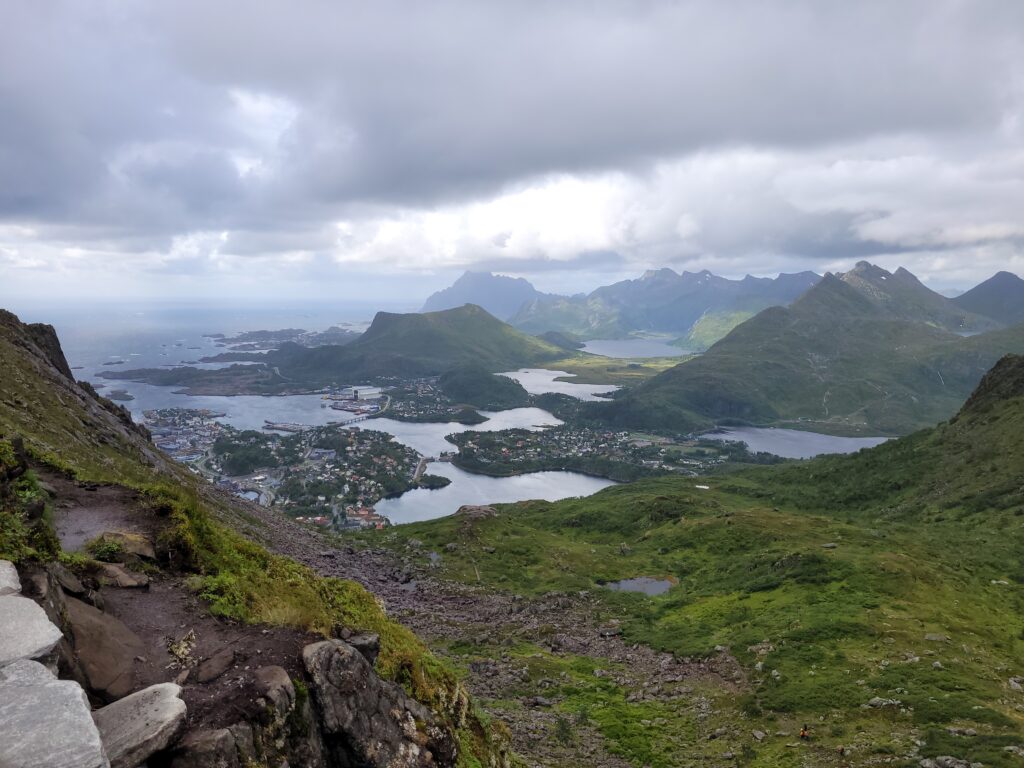
{
  "type": "image",
  "path": "/data/media_classifier/uploads/20260302T221329_26d1b32d.jpg",
  "original_path": "20220805_122117.jpg",
  "result": {
    "primary_label": "djevelporten in svollv\u00e6r",
    "secondary_labels": [
      "norway",
      "mountain",
      "view",
      "coast"
    ],
    "confidence": 0.9,
    "short_description": "a scenic view from djevelporten in svollv\u00e6r, showcasing the rugged mountains and coastal landscape.",
    "place": {
      "gps_lat": 68.25082796666666,
      "gps_lon": 14.597709,
      "place_id": "Djevelporten",
      "place_label": "Djevelporten in Svolv\u00e6r",
      "place_kind": "rock_formation",
      "place_has_view": false,
      "place_distance_m": 11.84395459307787,
      "place_source": "registry"
    }
  },
  "faces": [],
  "vision_model": "qwen2.5vl:7b",
  "place": {
    "gps_lat": 68.25082796666666,
    "gps_lon": 14.597709,
    "place_id": "Djevelporten",
    "place_label": "Djevelporten in Svolv\u00e6r",
    "place_kind": "rock_formation",
    "place_has_view": false,
    "place_distance_m": 11.84395459307787,
    "place_source": "registry"
  },
  "hints": null
}
A minor detail here: «the Norwegian fjord»? And not «a Norwegian fjord»? Still, before my has_view, this was actually «A view of Djevelporten», so it’s definitely an improvement.
Actually a picture of Djevelporten
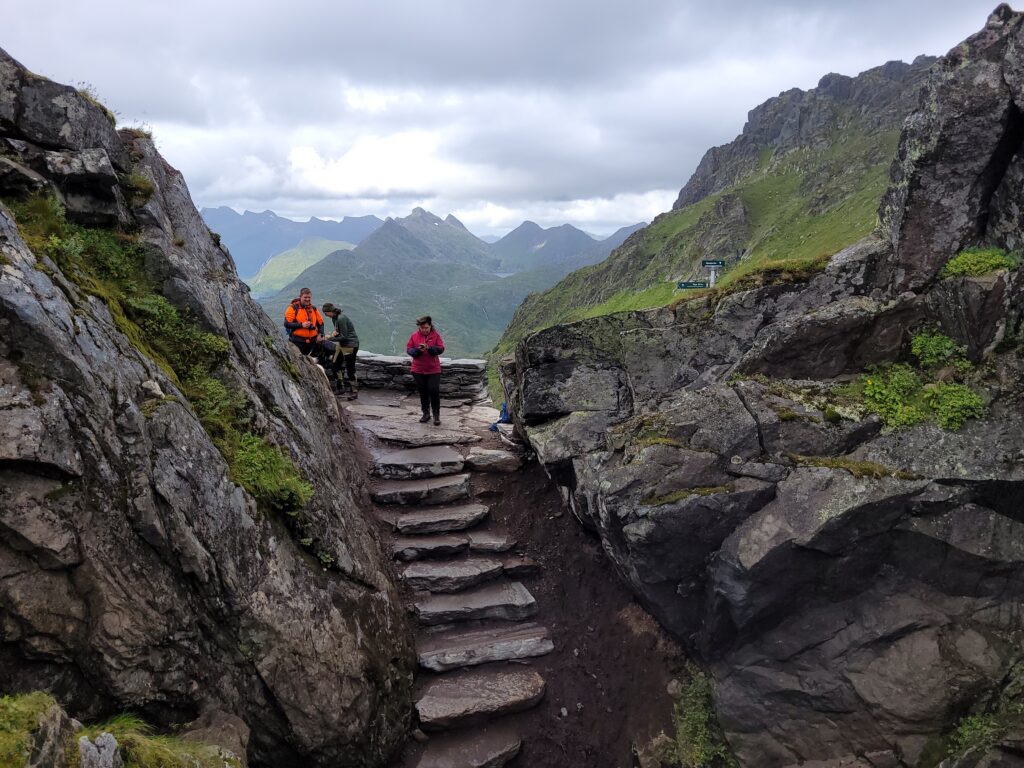
{
  "type": "image",
  "path": "/data/media_classifier/uploads/20260302T221955_0b4efa0d.jpg",
  "original_path": "20220805_121931.jpg",
  "result": {
    "primary_label": "djevelporten",
    "secondary_labels": [
      "hikers",
      "mountain path",
      "rocky terrain",
      "cloudy sky"
    ],
    "confidence": 0.9,
    "short_description": "hikers navigate a narrow rocky path at Djevelporten in Svolv\u00e6r, surrounded by rugged mountains and a cloudy sky.",
    "faces": {
      "faces": [
        {
          "index": 0,
          "bbox": [
            1188,
            1146,
            1225,
            1192
          ],
          "det_score": 0.6641488671302795,
          "person": null,
          "distance": 1.30506432056427,
          "status": "unknown"
        },
        {
          "index": 1,
          "bbox": [
            1657,
            1270,
            1695,
            1317
          ],
          "det_score": 0.5078306198120117,
          "person": "Anita",
          "distance": 0.0,
          "status": "known",
          "person_internal": "Anita",
          "person_display": "Anita",
          "person_hier_tag": "Familie|Anita"
        }
      ]
    },
    "place": {
      "gps_lat": 68.2508339666616,
      "gps_lon": 14.597996,
      "place_id": "Djevelporten",
      "place_label": "Djevelporten in Svolv\u00e6r",
      "place_kind": "rock_formation",
      "place_has_view": false,
      "place_distance_m": 5.625422813503592e-07,
      "place_source": "registry"
    }
  },
  "faces": [
    {
      "index": 0,
      "bbox": [
        1188,
        1146,
        1225,
        1192
      ],
      "det_score": 0.6641488671302795,
      "person": null,
      "distance": 1.30506432056427,
      "status": "unknown"
    },
    {
      "index": 1,
      "bbox": [
        1657,
        1270,
        1695,
        1317
      ],
      "det_score": 0.5078306198120117,
      "person": "Anita",
      "distance": 0.0,
      "status": "known",
      "person_internal": "Anita",
      "person_display": "Anita",
      "person_hier_tag": "Familie|Anita"
    }
  ],
  "vision_model": "qwen2.5vl:7b",
  "place": {
    "gps_lat": 68.2508339666616,
    "gps_lon": 14.597996,
    "place_id": "Djevelporten",
    "place_label": "Djevelporten in Svolv\u00e6r",
    "place_kind": "rock_formation",
    "place_has_view": false,
    "place_distance_m": 5.625422813503592e-07,
    "place_source": "registry"
  },
  "hints": null
}
Here, it has actually identified that the picture isn’t a view from Djevelporten, so this is still «the magic» of the model, combined with the prompt. It has also identified Anita, but she’s not that prominent so the AI probably left her out of the description. I still haven’t nailed the control over when people is included in the description or not, though, but at least the tags get correct if the face models are good.
Anita looking at the view from Fløya
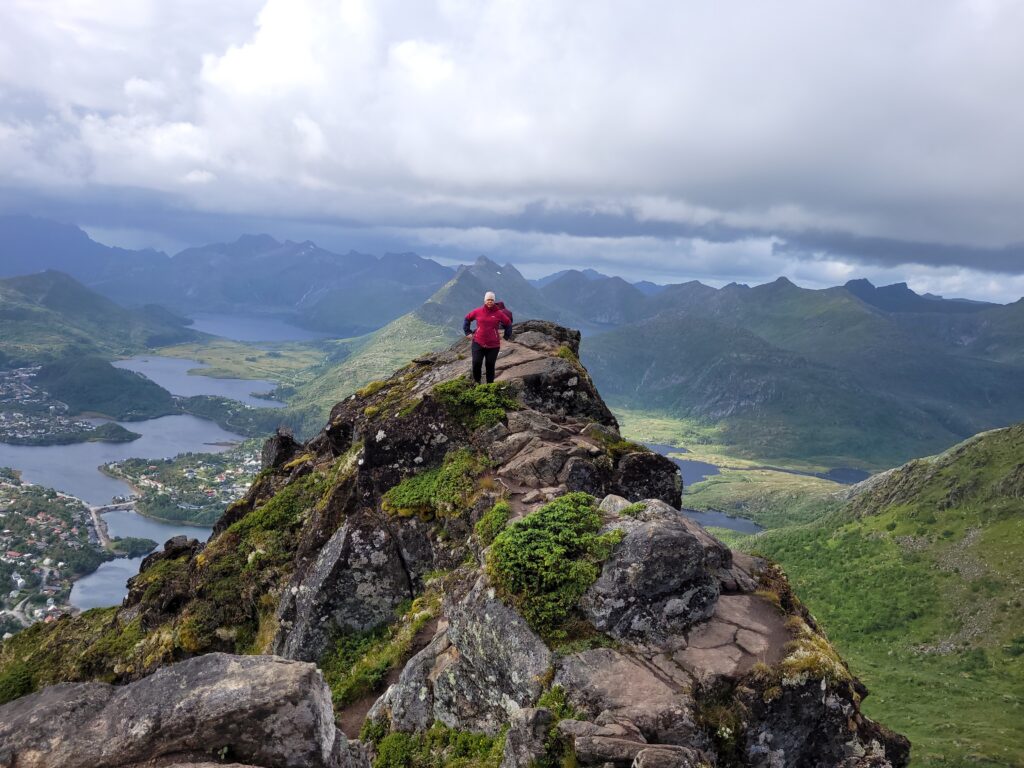
75251359-35c6-42b2-b7db-ca9802dc334f: finished
{
  "type": "image",
  "path": "/data/media_classifier/uploads/20260302T222815_9d23be27.jpg",
  "original_path": "20220805_132152.jpg",
  "result": {
    "primary_label": "Anita at Fløya",
    "secondary_labels": [
      "mountain top",
      "summit",
      "Norway",
      "landscape"
    ],
    "confidence": 0.95,
    "short_description": "Anita stands on the summit of Fløya, overlooking a scenic view of the surrounding mountains and fjords.",
    "faces": {
      "faces": [
        {
          "index": 0,
          "bbox": [
            1907,
            1159,
            1953,
            1218
          ],
          "det_score": 0.5499992370605469,
          "person": "Anita",
          "distance": 0.0,
          "status": "known",
          "person_internal": "Anita",
          "person_display": "Anita",
          "person_hier_tag": "Familie|Anita"
        }
      ]
    },
    "place": {
      "gps_lat": 68.24707896666666,
      "gps_lon": 14.595404966666667,
      "place_id": "Fløya",
      "place_label": "Fløya in Svolvær",
      "place_kind": "mountain_top",
      "place_has_view": false,
      "place_distance_m": 1.7382507648384806,
      "place_source": "registry"
    }
  },
  "faces": [
    {
      "index": 0,
      "bbox": [
        1907,
        1159,
        1953,
        1218
      ],
      "det_score": 0.5499992370605469,
      "person": "Anita",
      "distance": 0.0,
      "status": "known",
      "person_internal": "Anita",
      "person_display": "Anita",
      "person_hier_tag": "Familie|Anita"
    }
  ],
  "vision_model": "qwen2.5vl:7b",
  "place": {
    "gps_lat": 68.24707896666666,
    "gps_lon": 14.595404966666667,
    "place_id": "Fl\u00f8ya",
    "place_label": "Fløya in Svolvær",
    "place_kind": "mountain_top",
    "place_has_view": false,
    "place_distance_m": 1.7382507648384806,
    "place_source": "registry"
  },
  "hints": null
}
(here, the distance is 0.0, so I probably had to train on this picture to push it from maybe to known face).
Conclusions and further improvements?
I’m still pretty happy with the results. Even if the actual caption doesn’t always work out well, the tags for people and places work pretty well. Now, of course I wouldn’t need an AI for that, so the actual experiment in this system is how well an AI model can interpret and image and use metadata to describe the image accurately.
I find most of the texts it generates are correct. Not always useful, but it does serve as a good starting point and «bulk description» system.
One of the problems I mentioned in the face recognizion was the tendency to to infer relationships. It doesn’t do that as often now, with the new prompt, but it did gave me an idea: What if I actually register the relationships as metadata, so that it can say that Anita is holding her grandchild with correct knowledge?
I initially started on extending this to classify videos too, but as that is just an aggregation of image classifications, I have been concentrating on images.
I also want to experiment with different prompts for different types of images.
I am pretty sure I am not finished with this yet, but I am already using it for my image collection.